
Do I Need to Build My Own MCP Server?
- Agentic Systems
Once MCP clicks, the next question is whether you have to build something. Sort your tools into three buckets and you'll know what's a setup task and what's a real build.
In my last post I wrote about wrapping my head around MCP and how it fits into modern AI-centered software builds. It's a shared language that lets AI connect to your business tools, the way USB lets any device plug into any computer.
Once that clicked, my very next thought was the one I think every business owner has: okay, does this mean I'm signing up for a build project? Here's how I put it at the time:
“Would I need to build/configure my own MCP server? What does that entail? Do I manually add the tools to the MCP server that I set up?”
The answer I got was annoying and honest. “It depends.”
It depends on what you're connecting to. You might not need to build anything at all. You might need something custom. Most of the time it's a mix of both. "It depends" is only useful if you know what it depends on, so let's make it concrete.
Back to the llamas
If you read the first post, you met Ridgeline Llama Caddies, the company that rents trained llamas to carry golf bags on mountain courses. They're back, because they make a good test case. Ridgeline runs on a pretty normal small-business toolbox:
- HubSpot for customer records and follow-up emails
- Square to take payments
- LlamaLog, a homegrown app that tracks each llama's weight limit, temperament notes and last vet check
- TeeSheet Pro, the booking software the golf courses use for tee times
Ridgeline wants an AI assistant that can take a request like "Book Gertrude for the Hendersons at 8:10 Saturday" and handle it end to end. To do that, the assistant needs to reach all four systems. Each one falls into a different bucket.
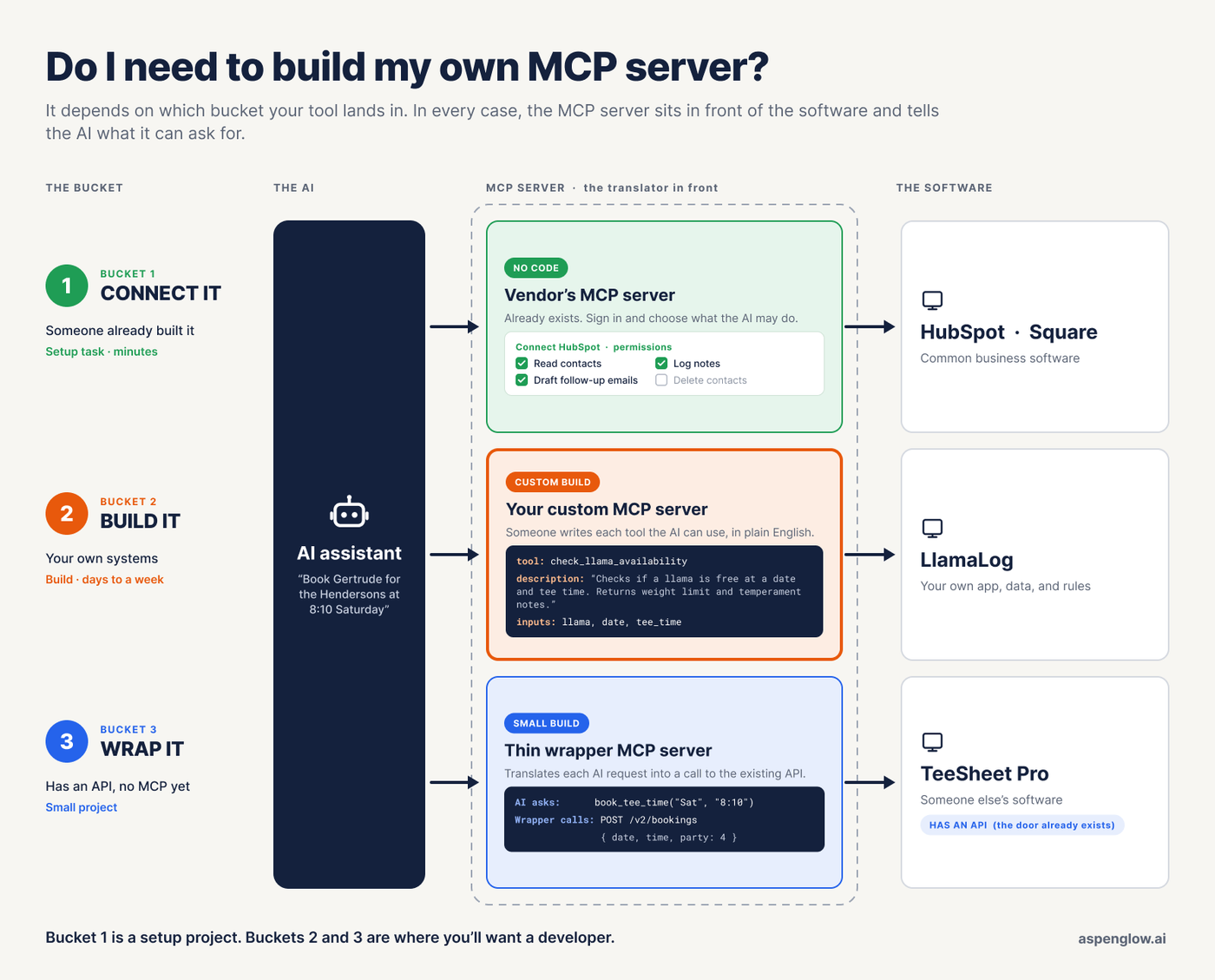
Bucket 1: Someone already built it
For a lot of common business software, the vendor or the community has already built an MCP server. HubSpot has official ones. Square has one. Stripe has one too. The list of companies with an MCP connector continues to grow. In fact, it is very likely that having an MCP access becomes the main selling point when considering two vendors offering the same service.
For these, nobody writes code. You point your AI at the existing server, sign in or hand it the right credentials, and it can see what that tool offers. Ridgeline's HubSpot and Square connections are a setup task, not a project. Takes less than a minute using even just browser based Claude.
The one decision here is permissions. Just because the HubSpot connection can delete contacts doesn't mean your assistant should be allowed to. Read-only is a perfectly good place to start. You can usually set the permissions pretty granularly when connecting to a server.
Bucket 2: Your own systems need a custom server
No vendor on earth has built an MCP server for LlamaLog. It's Ridgeline's own app, holding Ridgeline's own data. Nobody else knows that Gertrude tops out at 40 pounds or that Kevin doesn't do uphill par fives.
This is where you may have to build a tool to fit your AI-managed system. A custom MCP server sits in front of your own system tools and exposes the parts you choose to the AI. It doesn't replace LlamaLog or move the data anywhere. It's a translator that says "here's what the AI is allowed to ask for, and here's how to get it." I think of it as the sign at the trailhead. It tells the AI who is accessing your tool what actions can be found down each path and what to expect. The MCP layer works almost like that directory for your custom tool so that the AI knows which endpoints can be hit and what it is going to find behind each.
Almost every business has something in this bucket, even if it isn't an app. It might be your pricing rules, your job history, an inventory spreadsheet or the scheduling logic that lives in your office manager's head. Whatever makes your business yours usually ends up here. As you build more automated systems for your business, you’ll very likely end up with MCP connections to each part.
Bucket 3: It has an API but no MCP server yet
TeeSheet Pro is the in-between case. It isn't Ridgeline's software, but it also doesn't have an MCP server. What it does have is an API, the custom-built door from the first post.
So you build a thin wrapper: a small MCP server whose whole job is to take requests from the AI and turn them into calls to TeeSheet Pro's existing API. Smaller than bucket 2, because the door already exists as an API. You're just putting a standard handle on it.
Bucket 3 also tends to shrink over time. As more vendors ship their own MCP servers, tools move from bucket 3 to bucket 1 without you lifting a finger. In November of 2026, you can access almost any of the typical business tools to run your marketing, outreach, customer service, payments, and even software development via existing MCP connectors.
Try this: sort your own tools in five minutes
If you’re designing your own AI-powered software system, here is a simple exercise that you can start with. It takes about five minutes with a notepad.
- Write down the five to ten tools your team uses every day. Email, calendar, CRM, accounting, payments, your scheduling system, the spreadsheet everyone's afraid to touch.
- For each one, search "[tool name] MCP server." If the vendor has one, it goes in bucket 1.
- If it's something you built or had built for you, it goes in bucket 2.
- If it's someone else's software with an API but no MCP server, it goes in bucket 3. (Not sure if it has an API? Search "[tool name] API documentation.")
Here's how Ridgeline's list comes out:
- Bucket 1 (connect it): HubSpot, Square
- Bucket 2 (build it): LlamaLog
- Bucket 3 (wrap it): TeeSheet Pro
Bucket 1 is something you can start on this week. Buckets 2 and 3 are where you'll want a developer. If everything lands in bucket 1, congratulations, you have a setup project and not a build project.
Yes, someone writes the menu by hand
That covers the first half of my question. The second half was whether you have to manually add the tools to a server you build for bucket 2 items. The straightforward answer is that you do have to build it. Or have it built. Or have a company like Aspenglow build it for you.
For a custom server, someone decides each action the AI can take and writes a short definition for it.
Here's what one might look like for LlamaLog:
Tool: check_llama_availability
Description: "Checks whether a specific llama is free at a given date and tee time, and returns its weight limit and any temperament notes."
Inputs: llama name, date, tee time
The AI reads these definitions to decide which tool fits a request. So the description isn't a formality. If it says "gets llama info," the AI has to guess when to use it, and sometimes it'll guess wrong. If it says exactly what the tool does and what it returns, the AI picks it at the right moment.
As a product person, this is the part that blew my hair back. Writing a good tool description is a lot closer to writing a clear requirement than to writing code. I can essentially write the code in good ol’ English. The people who know the business best are often the right people to write your tool descriptions.
So what does this cost?
Bucket 1 costs you some time and thought about permissions. Bucket 3 is usually a small project because the hard part, the API, already exists.
Bucket 2 depends on how many actions you want the AI to take and how messy the system underneath is. A focused custom server with a handful of tools is typically a matter of days to a week or so, not months.
The bigger cost usually isn't the code. It's deciding what the AI should be allowed to do, and making sure someone can see what it did.
What this means for your business
You probably don't need to start by building anything. Sort your tools, connect what's already in bucket 1, and see what an assistant can do with read-only access. You'll learn quickly which of your own systems you really want it to reach.
If you sorted your list and ended up with something in bucket 2, that's the conversation we have at Aspenglow. We're happy to help you figure out what's worth building and what isn't.
Next up, I'll open the box. My next question was how all these tools and databases actually get "into" an MCP server.